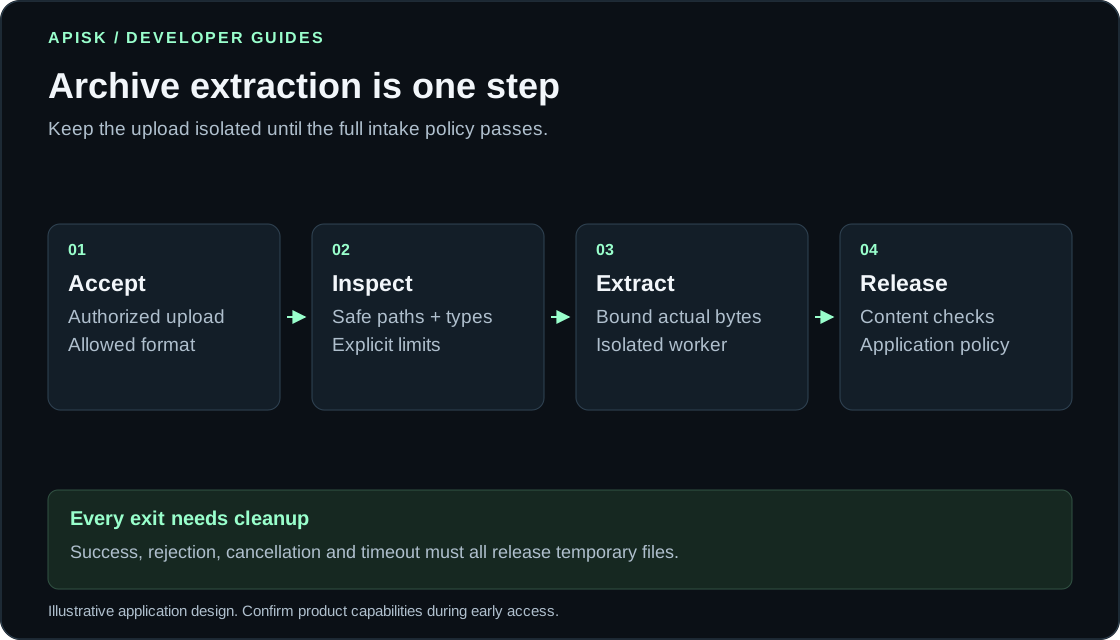
Secure ZIP and RAR Uploads: Prevent Zip Slip and ZIP Bombs
Treat every ZIP or RAR upload as a request to write untrusted files to your infrastructure. Familiar extensions reveal little about files; small uploads can expand far beyond their compressed size.
Accept invoice batches only after every member passes extraction policy and content checks. Keep intermediate files private; reject the whole batch for any member’s policy violation.
Define the upload contract
Authenticate the caller and authorize uploads for the intended account. Allow only needed formats; validate with an appropriate parser, not extensions or browser-supplied content types. Store uploads under application-generated names outside the webroot. These measures follow the OWASP File Upload Cheat Sheet.
For this invoice workflow, accept only ZIP and RAR. Explicitly reject unsupported compression or encryption; avoid arbitrary fallback tools. For other workflows, distinguish GZ’s compressed byte stream from TAR.GZ’s TAR archive, which requires member-level checks after decompression.
Encrypted ZIP/RAR files require passwords from authorized callers. Never attempt password recovery or cracking. Keep passwords out of logs; report missing passwords, unsupported encryption and unreadable archives without treating them as empty successful batches.
Constrain every destination for Zip Slip prevention
Path traversal (Zip Slip) occurs when archive member paths direct writes outside the intended extraction directory. Malware scanning checks content, not extraction destination containment.
Require relative member names. Reject absolute, drive-qualified and network paths, parent-directory components, and destinations escaping the extraction root under filesystem path rules. Reject ambiguous separators and names that collide after normalization or case handling. Do not silently rename a rejected path and continue.
For invoices, accept regular files and necessary directories only. Reject symbolic links, hard links and special files. Use a fresh private directory, prevent concurrent modification, and ensure filesystem operations cannot follow links outside it. A textual path-prefix check alone is insufficient.
Python’s ZIP documentation warns that zipfile.Path callers must sanitize filenames. For TAR workflows, Python extraction filters reduce some risks but provide neither a complete sandbox nor denial-of-service protection. Neither replaces application policy.
Enforce limits on actual work to contain decompression bombs
Decompression bombs consume disproportionate resources during expansion. They differ from path traversal and malicious content in otherwise ordinary files. Python lists disk exhaustion and interrupted extraction as ZIP decompression pitfalls.
During inspection, sum declared member sizes to reject obviously excessive jobs. Untrusted header totals cannot prove extraction will stay within budget. Count actual decompressed bytes per member and job; enforce limits while reading, before writing over-budget chunks.
These limits are an illustrative application design, not the Apisk API contract or recommended universal defaults:
| Resource | Example policy |
|---|---|
| Compressed upload | At most 10 MiB |
| Actual expanded output | At most 30 MiB total and 12 MiB per file |
| Archive members | At most 10, counting directories too |
| Directory depth | At most 2 directory levels |
| Nested archives | Reject; do not recursively extract |
| CPU and wall time | At most 5 CPU seconds and 15 elapsed seconds |
Inspect and extract in an isolated, unprivileged worker with restricted filesystem access, no application credentials and no unnecessary network access. Apply memory and disk limits externally as well.
Enforce resource limits before listing members; inspection consumes resources. A supervisor must terminate overdue work, including stalls application counters cannot interrupt.
Walk through a rejected invoice batch
Suppose an authorized customer submits a 4 MiB ZIP with three expected invoices and one unexpected member. Its declared 9 MiB expanded total passes the example size check.
| Member | Inspection decision |
|---|---|
invoices/invoice-01.pdf |
Eligible for bounded extraction |
invoices/invoice-02.pdf |
Eligible for bounded extraction |
invoices/invoice-03.pdf |
Eligible for bounded extraction |
| Member whose destination escapes the job directory | Reject the entire batch |
Path policy requires rejection despite small sizes and plausible invoice names.
Full inspection before extraction lets you reject this batch without writing invoices. If violations emerge during extraction, stop the worker and keep all partial output unavailable. Do not import the three apparently valid invoices: partial import silently violates all-or-nothing acceptance.
Record the rejection reason, remove partial output and delete the staged upload. Preserve originals needed for incident review in restricted quarantine with explicit review and deletion policies.
Inspection gates bounded extraction; content checks gate acceptance. Successful and failed jobs reach cleanup; starting decompression does not make intermediate output available.
Separate unpacking from content acceptance
Successful unpacking confirms extraction met policy, not that PDFs are harmless, readable or acceptable invoices. OWASP recommends content validation and antivirus or sandbox checks where appropriate in its upload guidance; a clean scan is not a safety guarantee.
Check that each extracted file has an allowed document type, parses within separate resource limits, and meets expected account and invoice requirements. Keep extraction, scanning and business validation outcomes separate.
Record failed reviews and unreadable files as explicit failures, never implicit passes. Promote files only after all required checks succeed.
Make archive cleanup an observable job outcome
Handle cleanup after success, rejection, extraction failure and cancellation. On success, persist accepted results in authorized storage before removing temporary inputs and outputs. On cancellation, stop the worker and close its handles before deleting its directory.
Record cleanup separately from processing: rejected uploads may still await deletion. Track deletion failures and orphaned job directories, retry cleanup safely, and alert when temporary data exceeds application retention policy. Queued deletion does not mean completed cleanup.
Apisk’s planned Unzip API covers ZIP, RAR, TAR and GZ uploads, caller-supplied ZIP/RAR passwords, and temporary cleanup. Confirm exact limits and retention during early access; these engineering recommendations do not claim deployed Apisk features.
Specify batch acceptance policy and cancellation cleanup behavior, then compare requirements with the planned Unzip API.
Frequently Asked Questions
How do I prevent an archive from writing files outside its extraction folder?
Validate every member’s destination using the filesystem’s path rules, rejecting traversal, absolute paths, ambiguous names and naming collisions. Allow only regular files and required directories, and make sure extraction cannot follow links outside a fresh private directory. Antivirus scanning cannot replace these destination checks.
Can a small ZIP or RAR file still exhaust server resources?
Yes: compressed size does not reliably predict expanded size or processing cost. Enforce limits on actual decompressed bytes, member count, directory depth and execution time, with external memory and disk restrictions. Start resource controls before inspection, since listing archive contents can also consume significant resources.
How should password-protected archives be handled?
Accept passwords only from authorized callers and use them only with supported archive encryption. Treat a missing or incorrect password, unsupported encryption or an unreadable archive as an explicit failure. Keep passwords out of logs and never attempt password recovery or cracking.
Can I import the valid invoices if another archive member fails?
Under this article’s all-or-nothing policy, a member’s policy violation rejects the entire batch. Keep any files that have already been extracted unavailable and remove partial output through the cleanup process. The customer can correct the archive and submit a new batch.
What checks are needed after an invoice is extracted successfully?
Verify its actual document type, confirm it parses within separate resource limits, and check that it meets account and invoice requirements. Run malware scanning or sandbox checks where appropriate, but do not treat a clean scan as proof of safety. Release the batch only when every required check has passed.
What should happen to temporary files after cancellation or failure?
Stop the worker and close its file handles before deleting the job directory and staged upload. Track deletion independently from processing status, retry failed deletions and monitor for leftover directories. If an original must be retained for incident review, place it in restricted quarantine with defined review and deletion rules.
Can I rely on the example limits as the planned Apisk Unzip API’s guarantees?
No: the limits illustrate an application policy and do not establish Apisk’s API contract or universal defaults. Confirm supported formats, encryption, resource limits and retention during early access. Also verify how the service’s acceptance and cancellation behavior fits your batch-processing requirements.